

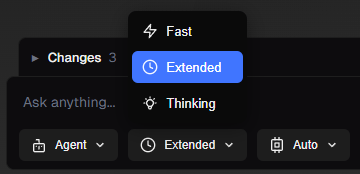
Choose how much of your project the assistant considers and how thoroughly it works. The mode affects both how much context is sent (scene, scripts, chat history) and how much effort the assistant can use (e.g. tool steps and reasoning).
Fast mode keeps things light so you get a quick answer with less of your project in view. Use it for simple questions, quick checks, or when you want a short response without deep analysis. The assistant sees less of your scene and scripts and uses fewer steps, so replies are faster and more focused. Best for: “What does this script do?”, “How do I add a Rigidbody?”, or when you’re iterating quickly and don’t need full context.
Extended is the default, balanced mode for most work. The assistant sees more of your project - deeper scene hierarchy, more scripts, and more chat history - and can take more steps to complete a task. Use it for typical requests like adding or changing behavior, fixing bugs, or when you want a solid answer without going to the heaviest mode. Best for: “Add a jump to my player”, “Why is this null?”, or any normal development task.
Thinking mode gives the assistant the most context and the most room to reason. It can see the most of your project (scene, scripts, history), take the most tool steps, and is explicitly prompted to think step by step and consider edge cases. Use it for hard design questions, tricky bugs, or when you want a deep, careful answer. Responses may take longer. Best for: “Design a save system that works with scenes and prefabs”, “This only fails sometimes - what could cause it?”, or when you need a thorough explanation or plan.