

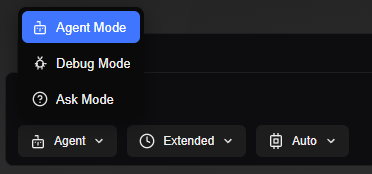
Agent Mode
Agent mode lets GladeKit apply changes in editor for you instead of only explaining. Use it when you want the assistant to create or edit things. For example: “Add a platform for my character to stand on” or “Add WASD movement scripts and functionality to my character”. In this mode the assistant uses all available tools (create scripts, GameObjects, components, etc.) and focuses on doing the work, not giving step-by-step instructions.Debug Mode
Debug mode is used for diagnosing all problems with your game and codebase. The assistant can read your project and scripts, and it can only usemodify_script to add or remove Debug.Log statements to help trace behavior. It will analyze code, add strategic logs, ask you to run the game and report what you see in the Console, then explain what’s going wrong and tell you to switch to Agent mode if you want it to apply a fix. It will not create GameObjects, add components, or change logic (except to add/remove its own debug logs).