

Choosing a model
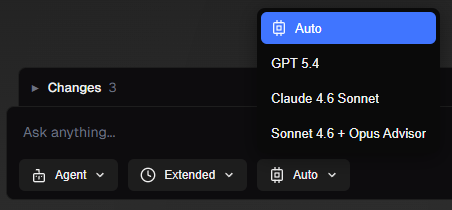
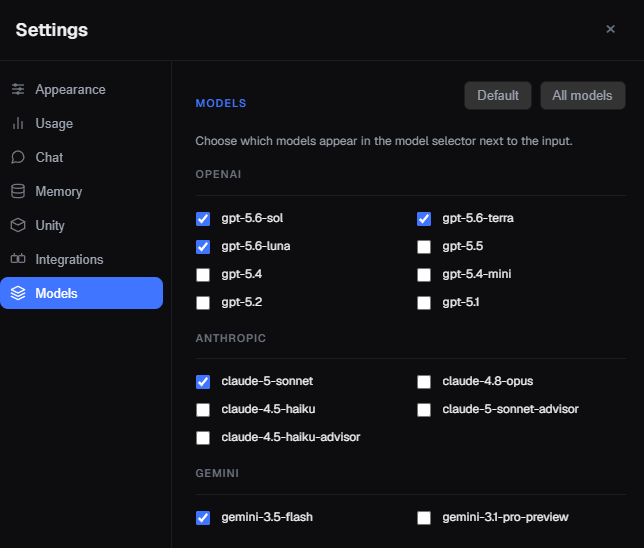
- Default pick: Auto lets GladeKit choose which model to use depending on your task. We recommend using Auto, GPT 5.6 Terra, or Claude Sonnet 5 for most tasks.
- Fast / cheap: Pair Fast input mode with a “mini” or “flash” model (e.g. GPT 5.6 Luna) for quick answers.
- Hard problems: Use Thinking input mode with a top-tier model (GPT 5.6 Sol, Claude Opus 4.8) when you need deep reasoning or complex code.
Local Model Integration
GladeKit can route requests to a locally running model server. This is useful if you want to use a custom fine-tuned model, keep data off the cloud, or just experiment with open-weight models. Supported servers Any server that speaks the OpenAI Chat Completions API works:- LM Studio —
http://localhost:1234/v1(default) - Ollama —
http://localhost:11434/v1 - llama.cpp —
http://localhost:8080/v1 - Any custom endpoint - set your own base URL in Settings
- Start your local server and pull a model (e.g.
ollama run qwen3:4b). - In GladeKit Settings → Models, enter your server’s base URL.
- Click Test connection. GladeKit will discover available models and add them to your model dropdown as Local: <model-id>.
- Tool budget is reduced. GladeKit sends a smaller set of tools (24 vs. 64) to local models because smaller models tend to degrade with large tool lists. Complex multi-step tasks may require more back-and-forth.
- Context windows are smaller. Most local models support 8k to 32k tokens. Very large projects or long conversations may overflow. If you see a context error, reload the model with a larger context (32768 is a good starting point in LM Studio or Ollama).
- Tool quality varies. Results depend heavily on the model size and how well it follows structured output. 7B to 14B models generally work better for agentic tasks than smaller ones.
- The cloud loop stays active. GladeKit’s agentic loop (planning, retries, context gathering) still runs in the cloud. Only the LLM inference call goes to your local server. Full offline mode is not supported.